Lead Statuses
Last updated: October 13, 2026
What this is
Every lead delivered to your campaign has a status. It tells you where the lead is in its journey and whether you need to do anything. This article explains each one.
Key takeaway: Most statuses are just for information: the platform is doing the work. Only Pending and Partially Verified need you. They mean a lead is ready for your review: approve it or return it.
The lead journey
Publisher submits a lead → Validating → passes checks → Pending or Partially Verified → you review → Approved (final) or Returned (publisher replaces it).
Leads that fail validation go straight to Rejected. They never reach your review, never count toward your goal, and are never charged to you.
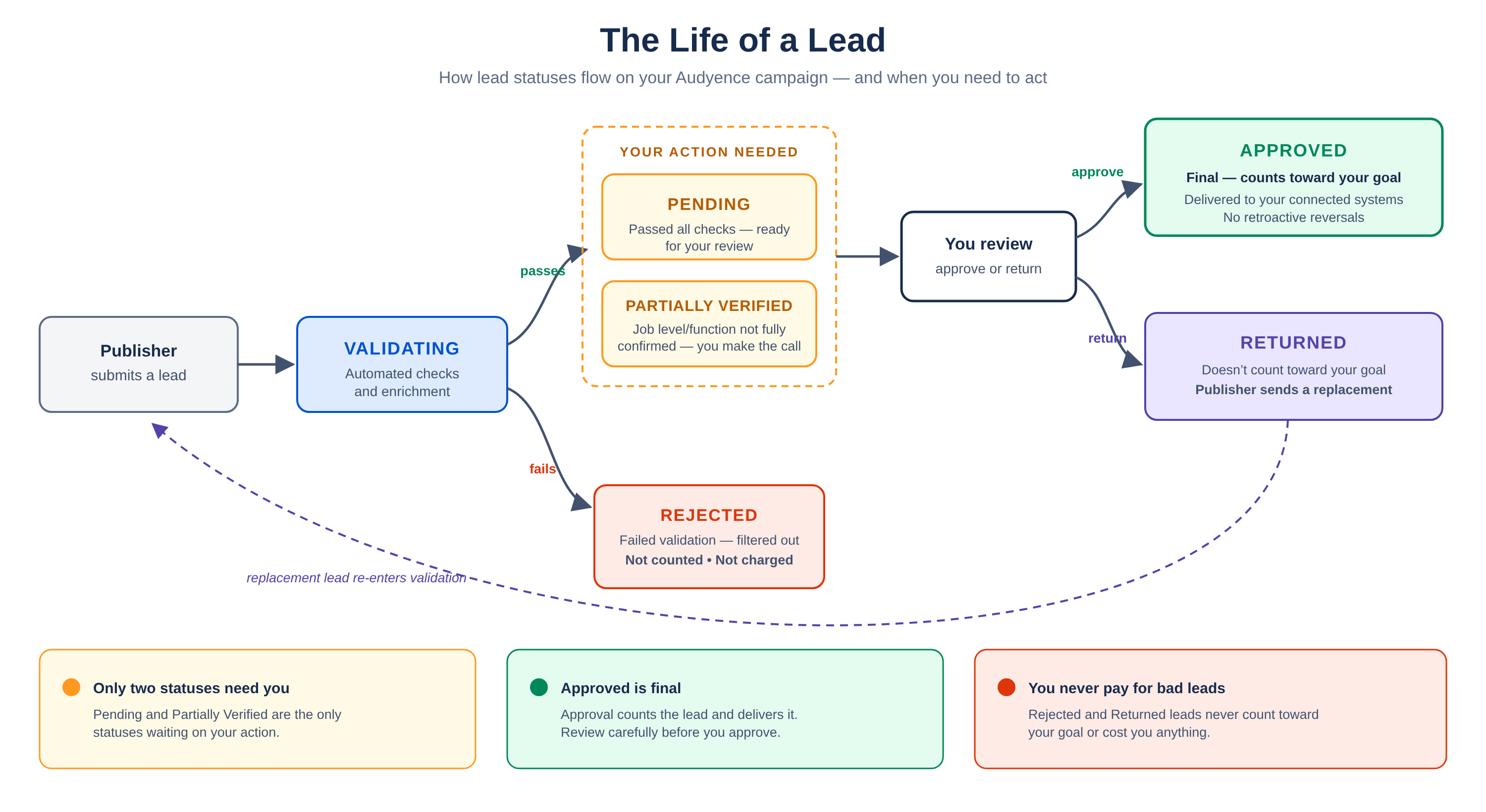
Lead statuses explained
Status | What it means | What you do |
|---|---|---|
Validating | The lead was submitted and is going through automatic validation. | Nothing. Check back shortly. |
Pending | The lead passed all validation and enrichment and is ready for your review. | Review the lead, then approve or return it. |
Partially Verified | The lead meets your criteria, but the system couldn't fully confirm the job level or job function. It's delivered for your review so you can decide. | Check the job level/function, then approve or return. |
Approved | You approved the lead. It counts toward your delivery goal and flows to your connected systems. This is final. | Nothing. It's counted and delivered. |
Rejected | The lead failed one or more validation checks and never reached your review. It doesn't count toward your goal and isn't charged to you. | Nothing. See Lead Validation Rules for why leads are rejected. |
Returned | You reviewed the lead and sent it back. It doesn't count toward your goal, and the publisher is asked to replace it. | Nothing more. The publisher provides a replacement. |
Approved is final
Warning: Once a lead is Approved, it counts toward your delivery total and campaign progress. It can't be reversed later, so review carefully before approving.
Quick reference
If you see… | Do this |
|---|---|
Validating | Wait. No action. |
Pending, Partially Verified | Review the lead, then approve or return it. |
Approved | Counted and delivered. Done. |
Rejected | No action. The lead failed validation and was filtered out. |
Returned | No action. A replacement is on the way. |
Tip: Filter your leads by Pending and Partially Verified to see only the ones waiting on you.
Related articles
How Leads Are Delivered: the full journey from generation to delivery
Lead Validation Rules: the checks every lead must pass
Lead Quality and Rejection: rejections, returns, and replacements
How to Download Approved Leads from a Live Campaign: get a file of a live campaign's approved leads