Lead Validation Rules
Last updated: October 13, 2026
What this is
Validation is how Audyence protects the quality, relevance, and accuracy of the leads delivered to your campaign. Every lead goes through these checks automatically before it reaches you.
Key takeaway: A lead must pass every check below to be delivered for your review. Leads that fail are rejected with a specific reason and never count toward your delivery total. The checks run in seconds, up front, so only quality leads reach you.
Where validation fits
Validation is the second of five stages every lead goes through, from the moment a publisher uploads it to the moment it lands in your systems:
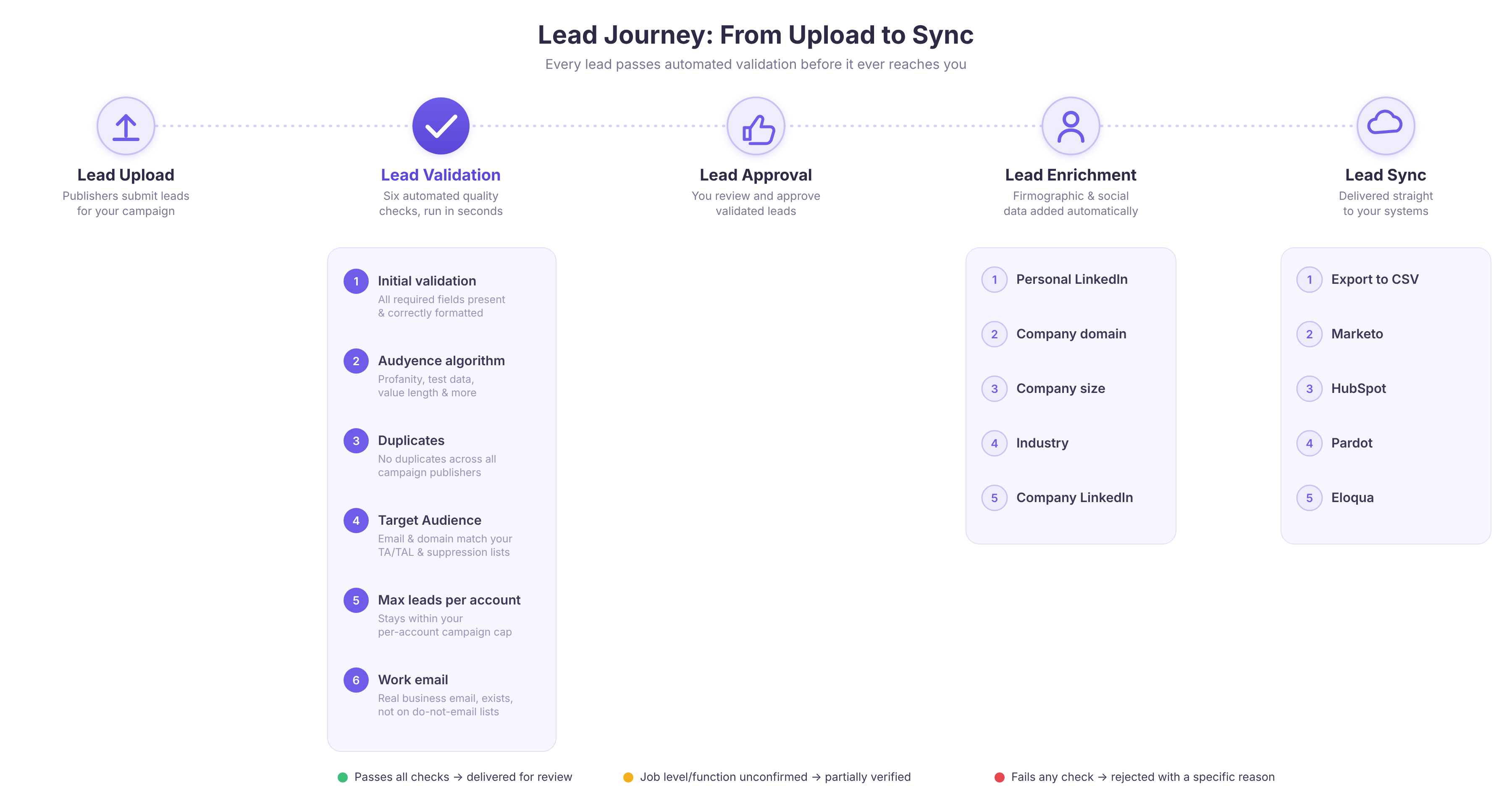
Validation at a glance
Check | What's checked | If it fails |
|---|---|---|
1. Completeness and format | All required fields are there and formatted correctly. | Rejected |
2. Audyence algorithm | Profanity, test data, value length, email format and domain, asset conversion. | Rejected |
3. Duplicates | The same work email isn't already on the campaign, across all publishers. | Rejected |
4. Target audience | Email/domain match to your TA or TAL, suppression list, job level and function. | Rejected (or Partially verified if job level/function can't be confirmed) |
5. Max leads per account | The lead count per company domain stays within your campaign cap. | Rejected |
6. Work email verification | Third-party check: syntax, domain, mailbox, spam traps, disposable and abuse addresses. | Rejected |
Each check in detail
1. Completeness and format
Every lead must include all fields your campaign requires.
Values must be present and in the expected format for each field.
A lead missing required data, or with data in the wrong format, is rejected.
2. Audyence algorithm checks
Profanity: leads with profanity are rejected.
Test data: leads with test data, or unrelated symbols such as currency or math symbols, are rejected.
Value length: unusually short or unrealistically long values are rejected (limits depend on each field's common standards).
Work email: the email must be formatted correctly by internet standards (RFC 5322) and use a business domain. Public/free email domains are rejected.
Asset (gated content): the lead must have converted on the specific content asset set for your campaign.
3. Duplicates
A lead is rejected if the same work email is already on your campaign.
Duplicate checks run across all publishers on the campaign, so a contact can't be delivered twice from different sources.
4. Target audience
Work email and company domain: must match your Target Audience, whether built from criteria or an uploaded Target Account List (TAL).
Suppression list: if the work email or company domain is on your suppression list, the lead is rejected.
Job level and job function: must match your Target Audience criteria. If the system can't confirm them, the lead is marked PARTIALLY VERIFIED and delivered for your review instead of being rejected.
Important: Audyence uses only the main domain from your TAL. Subdomains, parent/child domains, and global-local domain variations are rejected. Include every domain you want to accept.
5. Maximum leads per account
A lead is rejected if the number of leads from the same company domain goes over the per-account cap you set for the campaign.
The account is identified by the company domain taken from the work email.
6. Work email verification (third party)
Work emails are also checked by a third-party service:
Syntax: the address follows standard formatting rules.
Domain: the email domain exists and is set up to receive mail (DNS/MX records).
Mail server: the mailbox is confirmed active by talking to the mail server in real time (SMTP).
Spam traps: known spam-trap addresses are identified to protect deliverability.
Catch-all: domains that accept mail to any address are flagged.
Role-based: group addresses (such as admin@ or support@) are identified.
Disposable: temporary/disposable addresses are rejected.
Abuse: addresses with a history of spam or abuse are rejected.
Verification results
Verification result | Outcome |
|---|---|
Valid | Accepted |
Catch-All | Accepted as valid |
Invalid | Rejected |
Spam-trap | Rejected |
Abuse | Rejected |
Do Not Mail | Rejected |
Unknown | Rejected |
Note: Catch-all addresses are flagged but still accepted as valid. Unknown results are rejected.
What happens after validation
Approval: leads that pass every check are delivered for your review. Leads marked Partially verified are flagged so you can decide whether to accept them.
Enrichment: approved leads are enriched with personal LinkedIn, company domain, company size, industry, and company LinkedIn before delivery.
Sync: enriched leads go to your systems through CSV export or a direct integration with your marketing automation platform: Marketo, HubSpot, Pardot, or Eloqua.
Related articles
How Leads Are Delivered: where validation fits in the delivery journey
Lead Statuses: what each status means
Lead Quality and Rejection: common rejection reasons and how returns work