Preferred Deals
Last updated: October 13, 2026
What this is
Preferred Deals is a way of buying for companies that want predictable pricing and guaranteed value-add across campaigns.
With Preferred Deals, you commit to a spend amount for a set period. In return, all eligible campaigns run with a fixed cost per engagement (CPE) and an included value-add percentage, while the platform manages allocation, delivery, and reporting for you.
Key takeaway: Preferred Deals trade a spend commitment for cost certainty: fixed CPE, guaranteed free value-add leads, and automatic allocation across top publishers. If a campaign doesn't qualify, the platform prompts you to switch to Programmatic Guaranteed without losing your setup.
Use Preferred Deals when you want cost certainty, less day-to-day work, and consistent value across many campaigns, brands, or regions.
Who this is for
Marketing managers and demand generation teams
Campaign operators running multi-campaign or multi-region programs
Organization admins responsible for spend commitments
Teams or people responsible for budget planning and spend forecasting
Prerequisites
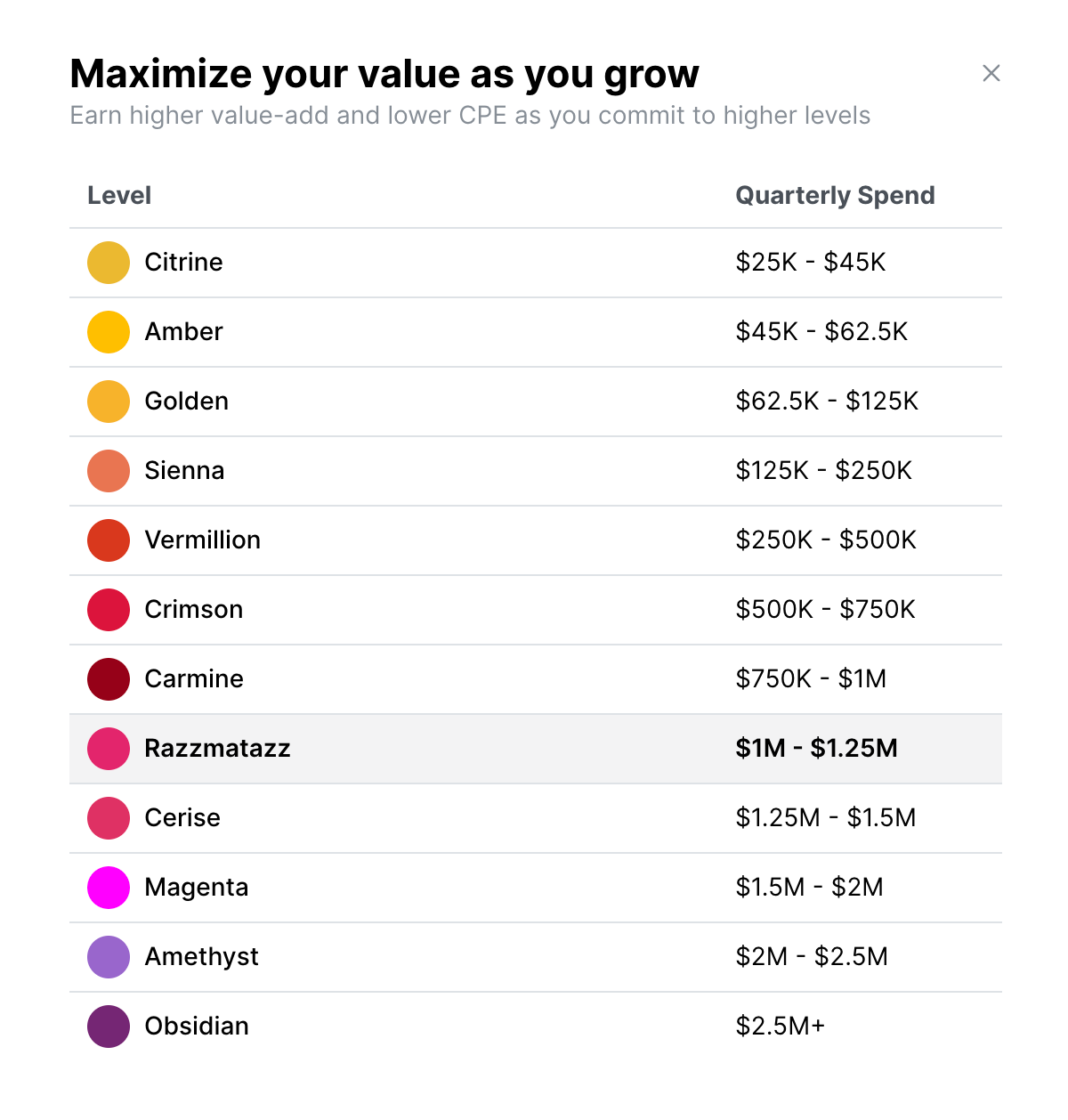
Before you use Preferred Deals, your organization must have an active Preferred Deal commitment. The commitment must include:
a set spend amount
a set commitment period
an agreed fixed CPE and value-add percentage
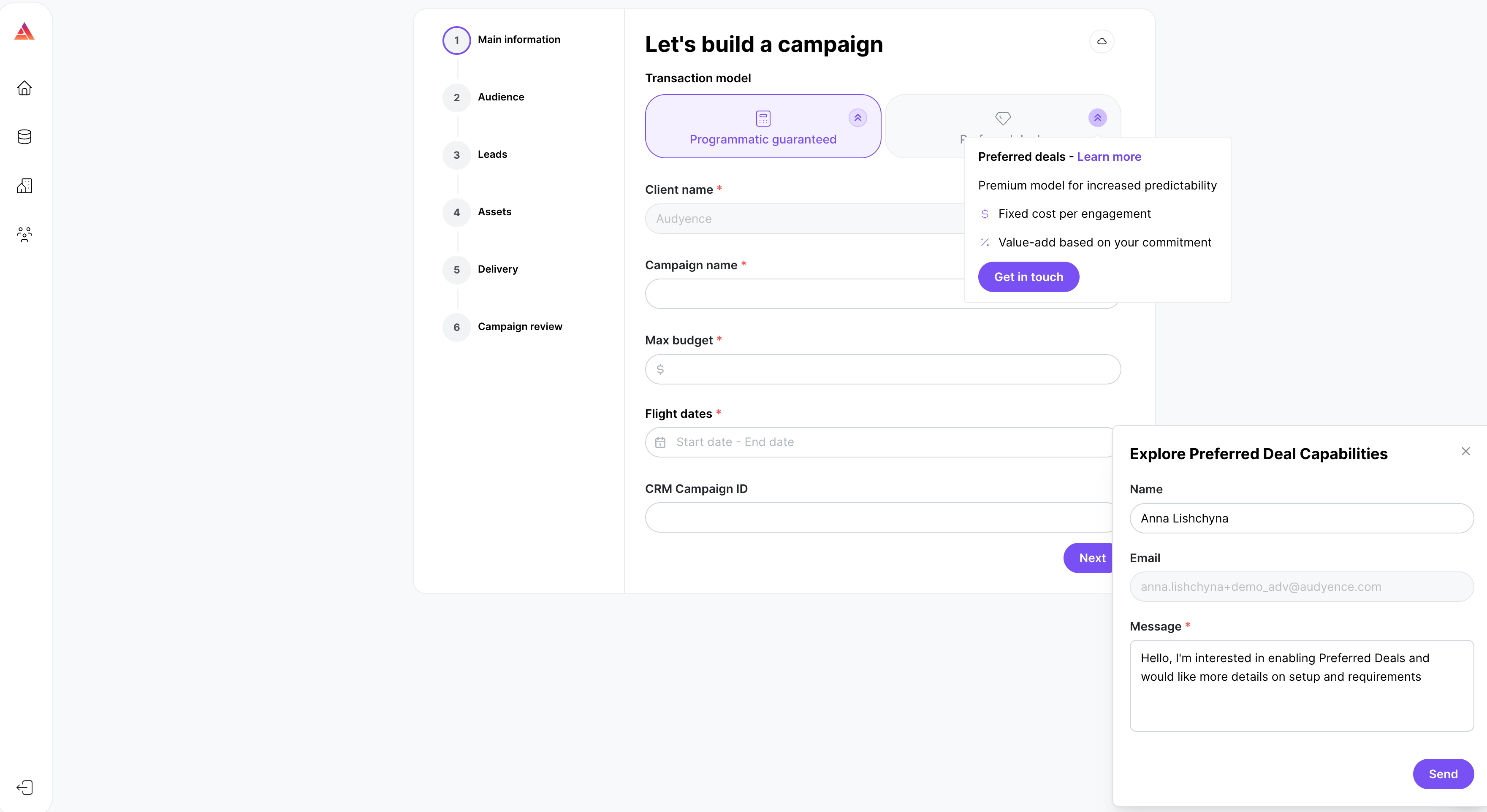
If your organization doesn't have a Preferred Deal yet, you can:
contact the sales team at sales@audyence.com, or
request one from the platform:
In the RFP Builder, hover over the Preferred Deal indicator on the first step.
Use the prompt to request a Preferred Deal proposal.
How it works
One Preferred Deal commitment can be used across regions and departments, so it can support many teams and campaigns.
You commit to a spend amount for a fixed period.
Campaigns created under the Preferred Deal inherit:
the fixed CPE
the guaranteed value-add percentage
The platform automatically:
allocates budget across eligible, best-scored publishers to get the best performance
delivers value-add engagements
tracks spend and how much of the commitment is used
Which campaigns qualify?
Campaigns qualify for Preferred Deals when they:
have a moderate-sized target audience
don't include custom questions for leads
Tip: If your campaign setup doesn't meet Preferred Deal limits, the system prompts you to switch to Programmatic Guaranteed. You keep your progress and don't have to restart setup.
View your Preferred Deal information
Once Preferred Deals are turned on, go to the Campaigns Dashboard.
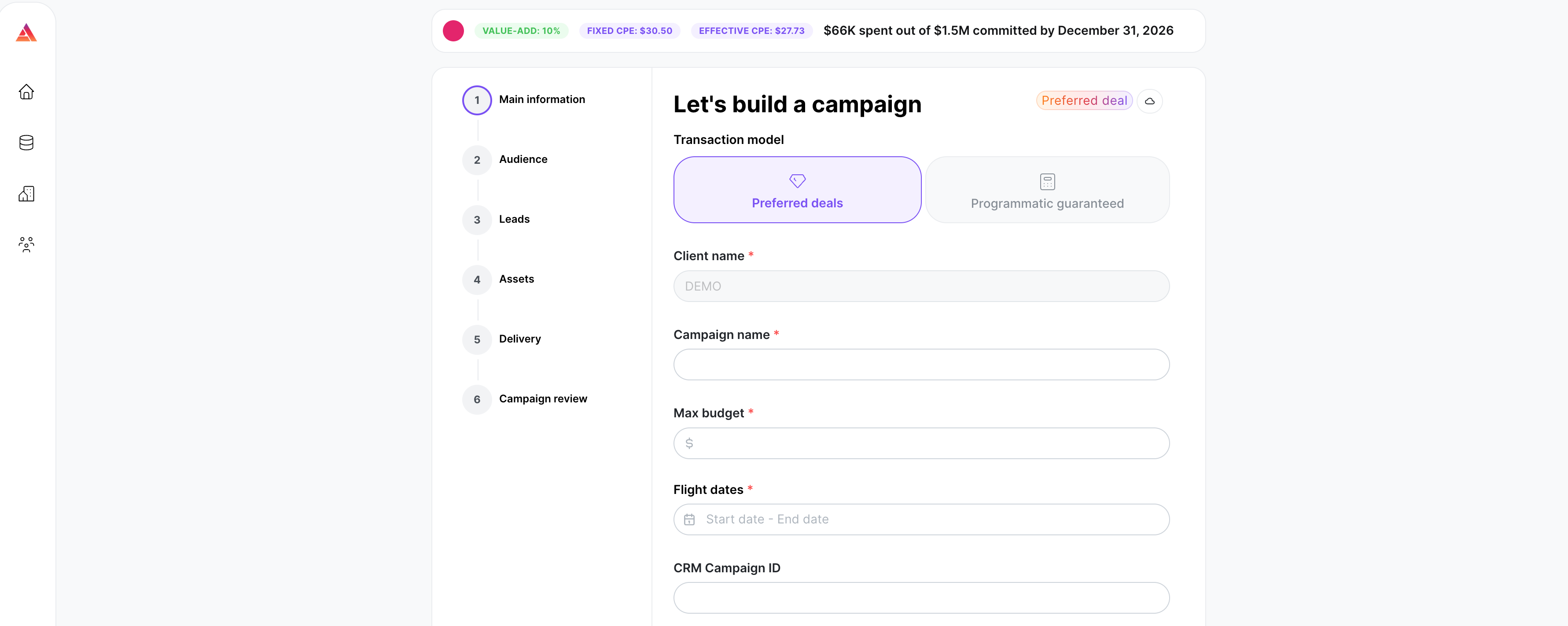
At the top of the dashboard, you'll see your Preferred Deal summary:
committed amount
spend progress
value-add delivered
commitment end date
This summary is always visible, so you can always see how much of your commitment is used across campaigns.
Create a campaign using Preferred Deals
Open the RFP Builder.
Select Create Campaign.
Under Transactional model, Preferred Deal is selected by default. You can change it to Programmatic Guaranteed.
Set up your campaign as usual: targeting, budget, timeline, and other settings.
Review the campaign summary. The fixed CPE and value-add are applied automatically.
Launch the campaign.
The platform applies the pricing and allocation rules of your Preferred Deal.
Publisher selection
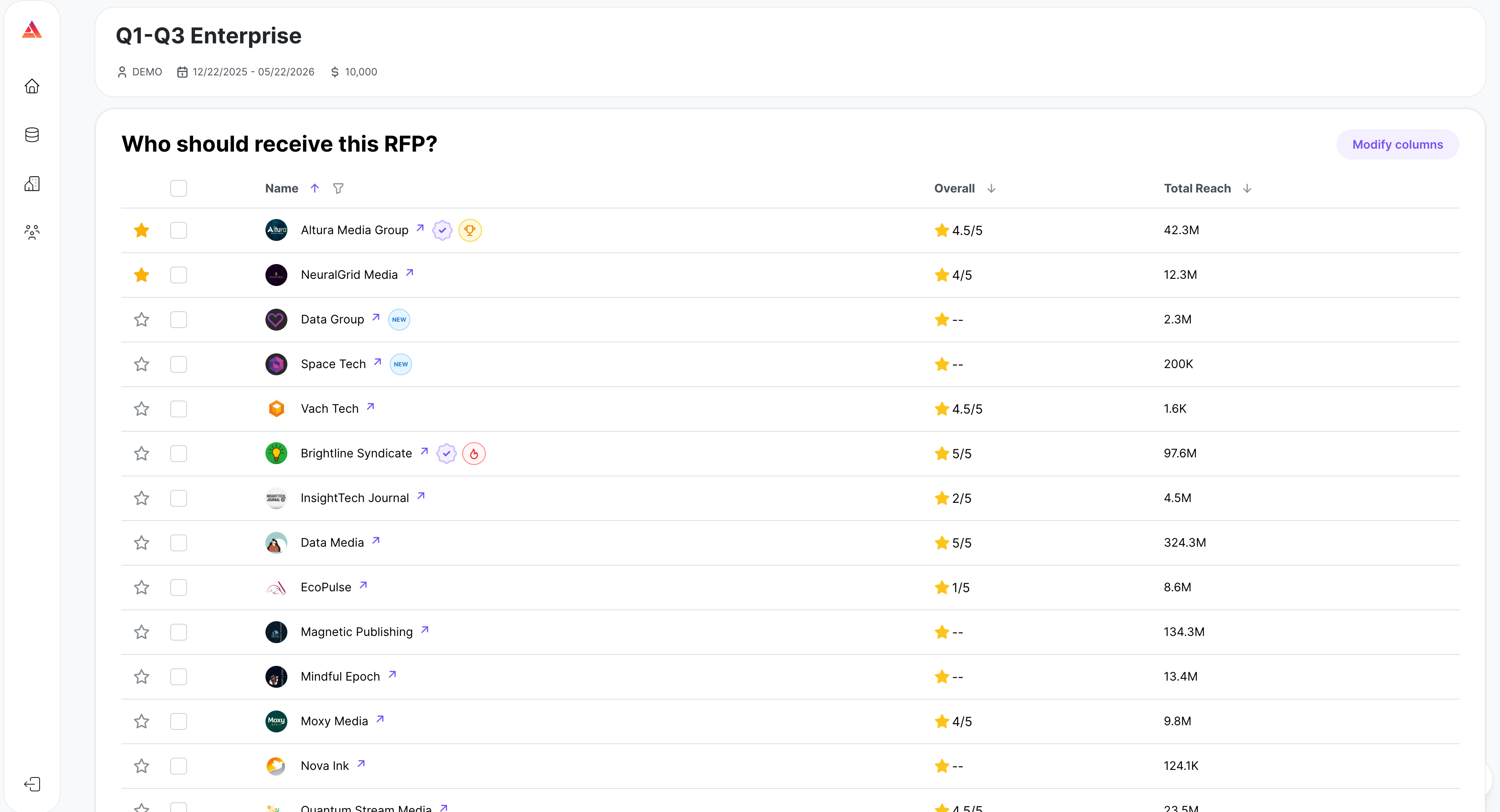
In Publisher Selection, choose the publishers you want to run the campaign with.
Publishers marked as Favorites get extra weight in allocation.
The platform ranks publishers mainly by past delivery data and performance score, to get the best results.
Automatic allocation
With Preferred Deals, budgets are split across eligible publishers automatically. The allocation puts first:
top-performing publishers
publishers you mark as favorites
You stay in control:
Mark publishers as Favorites to raise their priority.
Exclude publishers you don't want to take part.
Note: No manual budget splitting or publisher-by-publisher management is needed.
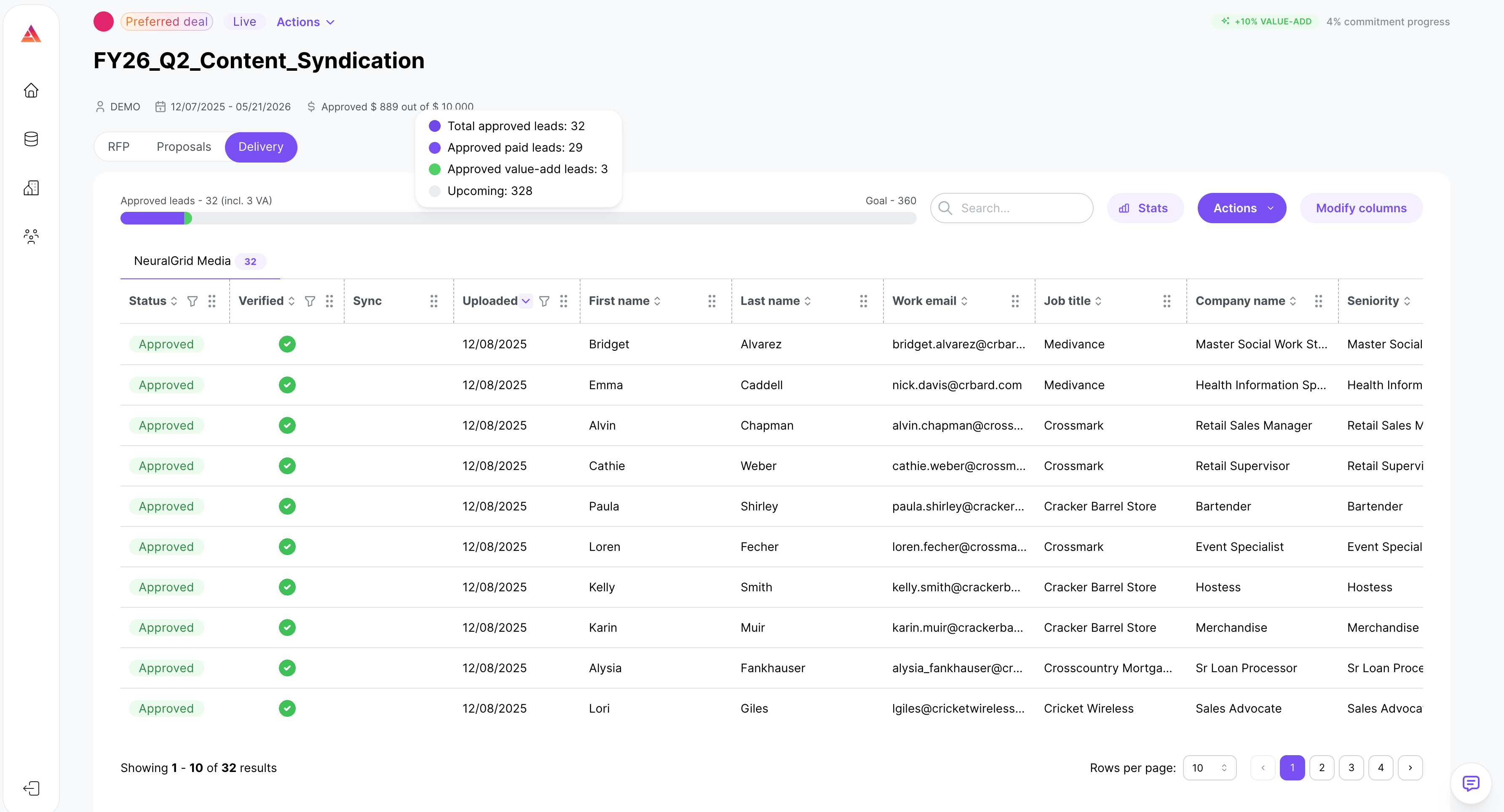
Lead delivery and reporting
Track delivery in real time on the Campaigns Dashboard, including:
paid leads delivered toward your campaign goal
value-add leads delivered at no extra cost
Paid and value-add leads are reported separately, so you always see both.
Frequently asked questions
What is the difference between Preferred Deals and Programmatic Guaranteed?
Preferred Deals are built for committed spend with predictable outcomes. Programmatic Guaranteed is built for flexibility and direct control.
Preferred Deals | Programmatic Guaranteed | |
|---|---|---|
Pricing | Fixed CPE, agreed upfront and protected from publisher price changes. The same price across all publishers. | Set by each publisher through proposals. May vary. |
Value-add | A guaranteed percentage of free leads on every campaign. | None. You pay for exactly the leads you buy. |
How publishers take part | They accept or reject an allocated bid. There's no proposal round. | They reply to your RFP with proposals (price and committed volume), and you choose who runs it. |
Allocation | Automatic across the best-performing publishers. Favorites get more weight. | Manual: you choose publishers and split the budget for each campaign. |
Commitment | A spend commitment for a set period, tracked across your company. | None. Campaign by campaign. |
Best for | Cost certainty, less day-to-day work, and consistent value across many campaigns, brands, or regions. | Campaigns outside Preferred Deal limits (custom lead questions, very narrow audiences), or hands-on control of each publisher's budget. |
Do Programmatic Guaranteed campaigns include value-add?
No. Guaranteed value-add is only for Preferred Deal campaigns. Programmatic Guaranteed campaigns don't include guaranteed free leads.
Do Programmatic Guaranteed campaigns have fixed CPE?
No. Only Preferred Deal campaigns use an agreed, fixed CPE. Programmatic Guaranteed campaigns use publisher-driven pricing, which may vary.
How do I turn on Preferred Deals?
Contact sales@audyence.com, or request it from the platform (see Prerequisites above).
How do I set up a Preferred Deal campaign?
If your organization already has Preferred Deals turned on, follow Create a campaign using Preferred Deals above. If you still have questions, contact support@audyence.com.
How can I tell if a campaign is a Preferred Deal?
Campaigns created with the Preferred Deal transaction type show a "Preferred Deal" label, and the Preferred Deal summary appears at the top of the Campaigns Dashboard.