Leads data to collect
Last updated: October 13, 2026
What this is
On this step you decide what a lead is worth to you and what data you get with each one. You choose:
how deeply a lead engages with your content (one content view, or several in a multi-touch campaign)
how many leads you'll accept from any one company
which fields the lead fills in on your form
which extra fields Audyence adds automatically (enrichment)
Key takeaway: These settings shape three things: the quantity of leads you get, the depth of each lead's engagement, and the completeness of the data on every lead. Audyence prices per engagement, so asking for more engagements per lead raises the cost of each lead.
What you set on this step
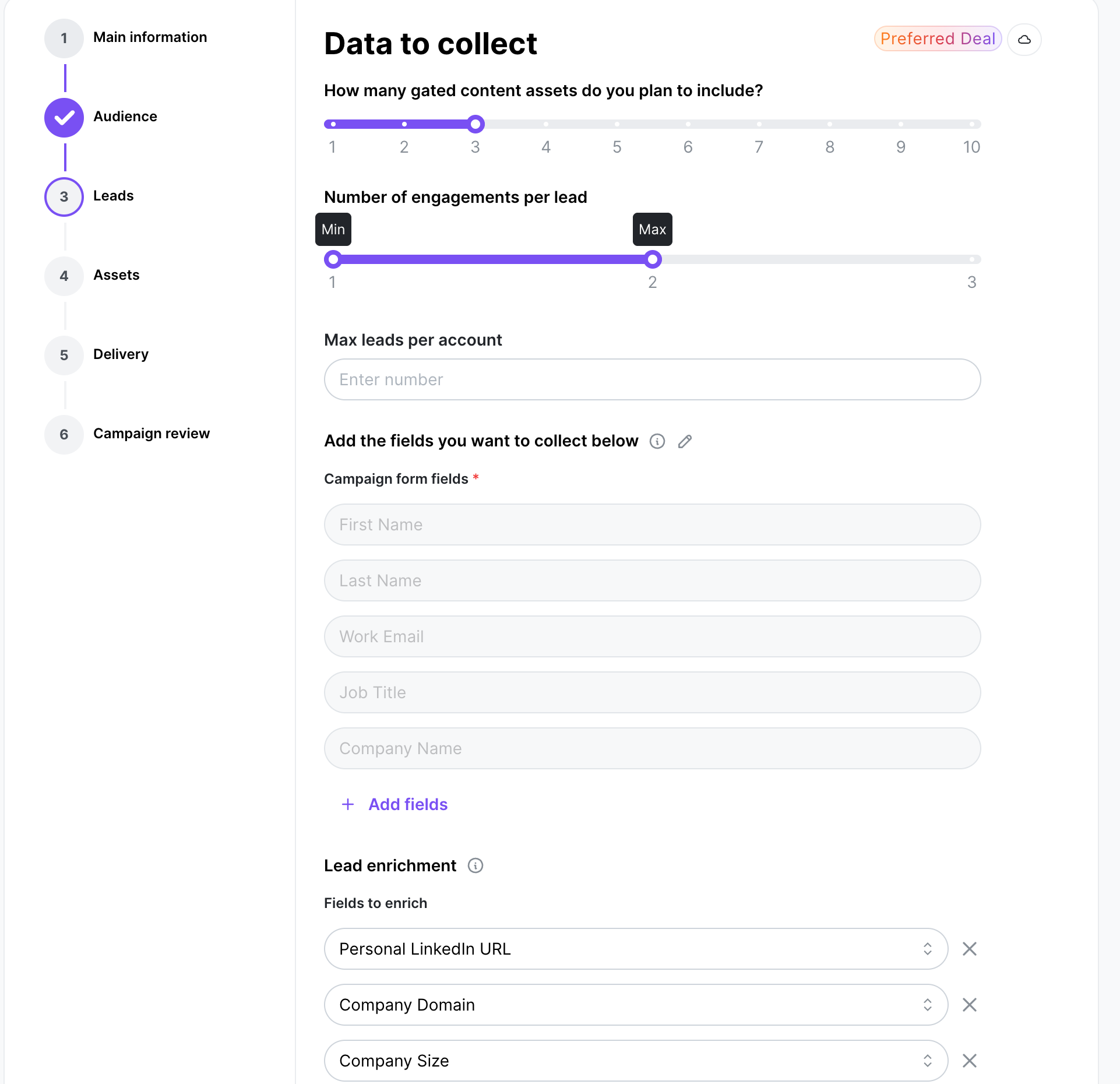
Setting | What it controls |
|---|---|
How many gated content assets do you plan to include? | How many content offers your campaign uses. |
Number of engagements per lead | The minimum and maximum content engagements needed to count as a lead. This makes a campaign single-touch or multi-touch. |
Max leads per account | The most leads you'll accept from one company. |
Campaign form fields | The information the lead fills in on your landing page form. |
Lead enrichment | Extra data added to each lead that the lead isn't asked to provide. |
Single-touch or multi-touch
The first two settings work together to make your campaign single-touch or multi-touch.
Note: A "touch" is an engagement: one time a lead engages with a piece of your gated content.
Single-touch | Multi-touch | |
|---|---|---|
Engagements to count as a lead | 1 | 2 or more |
Buying signal | Interest shown once | Repeated interest: a stronger signal |
Cost per lead | Lower (fewer engagements) | Higher (more engagements; see pricing below) |
How many gated content assets do you plan to include?
This tells the platform how many separate content offers (whitepapers, guides, reports, webinars) your campaign will run. Pick a number from 1 to 10 with the slider.
The number sets how many pieces of content a lead can engage with. It's the ceiling for a multi-touch campaign, because a lead can't have more engagements than there are assets.
You upload the actual content files later, on the Assets step. This setting is your plan, so the platform can shape the engagement model and landing page around it.
For a simple single-asset offer, set it to 1.
Number of engagements per lead
This is a range with a minimum and a maximum handle:
Minimum: the engagements needed before a lead qualifies and is delivered to you. Set it to 1 for single-touch, or 2 or more for multi-touch.
Maximum: the most engagements counted for one lead. It caps how much a very engaged lead can add (and cost).
The maximum can't be more than the number of gated content assets above. A lead can only engage with content that exists.
How pricing changes
Important: Audyence prices per engagement (CPE), not per lead. An engagement is one time a lead engages with a piece of your gated content. A single-touch lead (one engagement) costs about one CPE. A multi-touch lead that needs three engagements costs about three times the CPE.
Raising the engagements-per-lead range increases the depth and quality of each lead and the cost to get it. Balance the two against your budget and your goal.
Max leads per account
The most leads you'll accept from any one company (account). Enter a number, or leave it blank for no cap.
Cap | Effect | Best for |
|---|---|---|
Lower | Spreads delivery across more companies (breadth). | Broad awareness across an industry. |
Higher | Focuses delivery on fewer companies (depth). | A focused account-based (ABM) push. |
Campaign form fields
These are the fields a lead fills in on your landing page form: the information you collect straight from the prospect. A default set is included and marked as required:
First Name
Last Name
Work Email
Job Title
Company Name
Use Add fields to include other fields your team needs.
Important: Keep the form short. Every extra field lowers form completion, which lowers the number of leads you get. Ask only for what you'll act on, and let enrichment (below) handle the rest.
Lead enrichment
Lead enrichment is extra data added to each lead that the prospect is not asked to fill in. Under Fields to enrich, select the extra details you want added to every lead, for example:
Personal LinkedIn URL
Company Domain
Company Size
Industry
Add or remove enrichment fields with the controls next to each one.
Tip: Enrichment gives you a more complete lead record without a longer form. You collect the basics on the form, and Audyence adds the enrichment fields behind the scenes, so your leads arrive richer without hurting conversion.
Tips
Start single-touch (minimum engagements = 1) unless you need the stronger signal of multi-touch. You can ask for more depth once you know the audience converts.
Match your engagements maximum to the number of content assets you actually plan to upload. Setting it higher has no effect.
Keep the form short. Collect only the fields your team will act on, and move "nice to have" details into enrichment so completion stays high.
Set Max leads per account to match your strategy: lower for breadth, higher for account-based depth.