Delivery Pacing — near-real-time vs. weekly paced
Last updated: October 13, 2026
What this is
The Delivery step controls how leads reach you. You decide whether leads arrive as a steady stream the moment they're ready, or in scheduled weekly batches. If you choose batches, you also decide exactly how your total lead volume is spread across the campaign's flight (the dates your campaign runs).
Getting this right means leads arrive at a pace your team can act on, and delivery stays smooth across the campaign instead of arriving all at once or trailing off at the end.
Key takeaway: Choose Near real-time unless your team works leads on a fixed weekly schedule. It's the default, and faster follow-up converts best. Weekly batches are for teams with set weekly workflows, or a large committed volume to spread over a long flight.
What you set on this step
Setting | What it does |
|---|---|
Distribution frequency | Whether leads are delivered in near real-time or in weekly batches. |
Leads upload day | For weekly batches: the day of the week each batch is delivered. |
Leads upload pacing | For weekly batches: how your total lead volume is split across the batches in your flight. |
Note: The upload day and pacing settings appear only after you choose weekly batches. With near real-time, there are no batches to schedule.
Choosing a distribution frequency
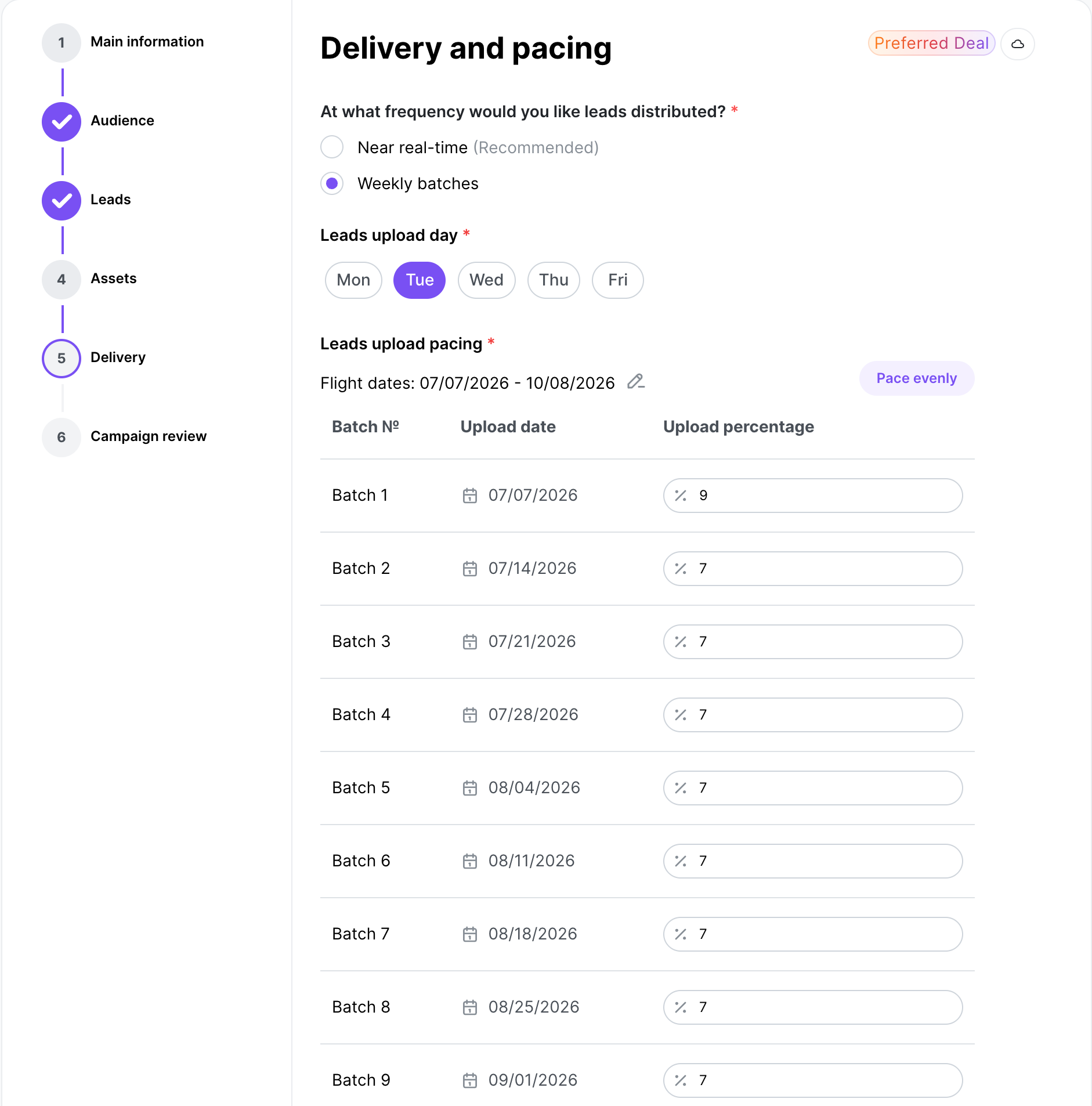
The first question on the step is "At what frequency would you like leads distributed?" You have two options.
Near real-time (recommended)
Leads are delivered continuously, as they're generated, validated, and enriched. There's no waiting and no schedule: a qualified lead reaches you shortly after it's produced.
Tip: Why it's the default: speed-to-lead. Your team can follow up while a prospect's interest is still fresh, which is when outreach converts best. Choose near real-time unless you have a specific reason to hold leads back.
Weekly batches
Leads are collected and delivered once a week, on a day you choose, following a pacing schedule you set. A lead may wait until the next batch before it reaches you, so speed-to-lead is slower, but you get a predictable, controlled rhythm.
Weekly batches make sense when:
Your team works new leads on a fixed schedule (for example, an SDR team that works a fresh list every Monday).
Your CRM or marketing automation import runs on a set schedule, and you want delivery to line up with it.
You're running a large, committed volume over a long flight and want to spread delivery evenly instead of getting everything up front.
At a glance
Near real-time | Weekly batches | |
|---|---|---|
Delivery timing | Continuous, as leads are ready | Once a week, on your chosen day |
Speed-to-lead | Fastest | Slower (leads wait for the next batch) |
Rhythm | Varies | Predictable and controlled |
Best for | Most campaigns; fast follow-up | Fixed weekly workflows; pacing a large committed volume |
Leads upload day
When you choose weekly batches, you pick the day of the week your batches are delivered. Every batch uploads on that day, so leads arrive on a steady, predictable rhythm.
Tip: Pick the day your team is ready to act on new leads. For example, an early-week day means a fresh batch is waiting at the start of the working week.
Leads upload pacing
Here you decide how much of your total lead volume arrives in each weekly batch. Audyence lays out a batch schedule based on your flight dates (your campaign's delivery window), and you control the share delivered in each batch.
The schedule is a table with one row per batch:
Column | What it shows |
|---|---|
Batch № | The batch's number in the sequence. |
Upload date | The date that batch is delivered, based on your upload day and flight dates. |
Upload percentage | The share of your total lead volume delivered in that batch. Across all batches, the percentages should total 100%. |
Two controls shape the schedule:
Flight dates: your delivery window (you can edit it). The length of the flight and your upload day together decide how many batches there are.
Pace evenly: a one-click action that splits your volume equally across all batches, so you get the same delivery every week.
Pacing patterns
Starting from an even split, you can change any batch's percentage to shape delivery:
Even: the same volume every week. Use Pace evenly. Best for smooth, predictable delivery, especially over a long flight.
Front-loaded: higher percentages in the early batches, when you want more volume sooner.
Back-loaded: higher percentages later in the flight.
Important: Whatever pattern you choose, keep the upload percentages totaling 100% so your full lead volume is scheduled.
Pacing a committed flight
For committed campaigns that run over a long window (delivering against a fixed commitment and end date), weekly pacing helps you spend down a large commitment smoothly and predictably. Instead of a rush of leads early and then a slowdown, an even pace keeps volume steady across the whole flight. That's easier for your team to work and gentler on delivery.
Note: A longer flight spreads volume thinner each week. A shorter flight concentrates it.
How to choose
Choose | When |
|---|---|
Near real-time | Most campaigns. Faster follow-up, no scheduling to manage. |
Weekly batches | Your team works leads on a set weekly schedule, delivery needs to line up with a downstream import, or you're pacing a large committed volume across a long flight. |
Tips
Default to near real-time unless your team needs a fixed weekly rhythm. Speed-to-lead usually wins.
If you batch, start with Pace evenly, and change individual batches only if you have a reason to front-load or back-load.
Make sure your upload percentages total 100% so your full volume is scheduled.
Match your upload day to when your team actually works new leads.
Over a long flight, even pacing keeps weekly volume manageable and delivery steady from start to finish.